-
Administrator

Re: Assignment 15: Motion Blur
Steve-
When composing a message where you want to include a flickr image, use the "Use Rich Formatting" option below. Compose the message as usual. When you want to insert the flickr HTML script, click on the "HTML" button above the composition window. Paste the HTML code there, and click "Update." You should see the image appear in the composition text box.
-Sean
-
Re: Assignment 15: Motion Blur
Yeah, I noticed! Fixed now... Oh Well, C'est la VIE!
Thanks!
-
Senior Member

Re: Assignment 15: Motion Blur
Here are 2 that I like. I will enter the second one into the contest.
[img]/resized-image.ashx/__size/800x800/__key/CommunityServer-Discussions-Components-Files/26/3060.IMG_5F00_7474.jpg[/img]
Canon 7D, EF 70-200 f/4L IS, ISO 100, f/14, 1/10s at 97mm
[img]/resized-image.ashx/__size/800x800/__key/CommunityServer-Discussions-Components-Files/26/7206.IMG_5F00_9355.jpg[/img]
Canon XS, EF 17-40 f/4L, ISO 100, f/11, 1/15s at 17mm
-
Super Moderator

Re: Assignment 15: Motion Blur
King
Loving #2.
You may want to specify which you are entering.
-
Senior Member

Re: Assignment 15: Motion Blur
I like the second King submitted photo.
-
Re: Assignment 15: Motion Blur
[img]/resized-image.ashx/__size/800x800/__key/CommunityServer-Discussions-Components-Files/26/4682.IMG_5F00_1890.JPG[/img]
f/4.0, 0.4 exp, hand held
-
Re: Assignment 15: Motion Blur
what would be cool is if we could choose for which ones to vote.
-
Re: Assignment 15: Motion Blur
I'll add one.
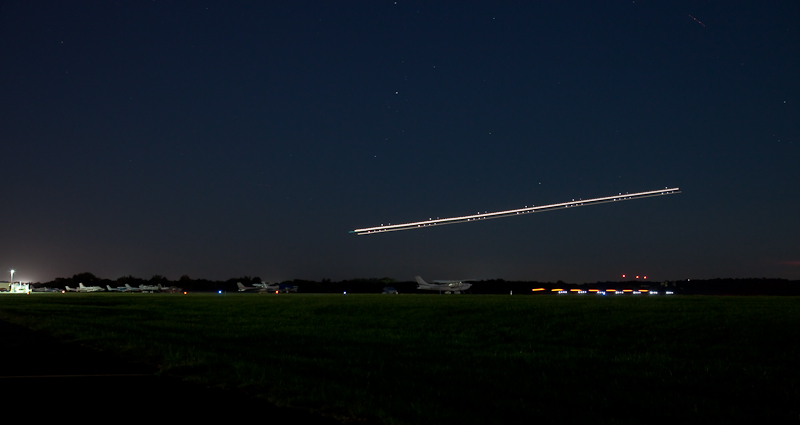
5DMII, 8 secs.f/6.3, 47mm (24-105L) ISO 800
Larry
 Posting Permissions
- You may not post new threads
- You may not post replies
- You may not post attachments
- You may not edit your posts
-
Forum Rules


 Reply With Quote