Results 1 to 10 of 47

Thread: Software Recommendations

Hybrid View

Previous Post Previous Post   Next Post Next Post
  1. #1
    Senior Member neuroanatomist's Avatar
    Join Date
    Jan 2009
    Location
    Boston, MA
    Posts
    3,922
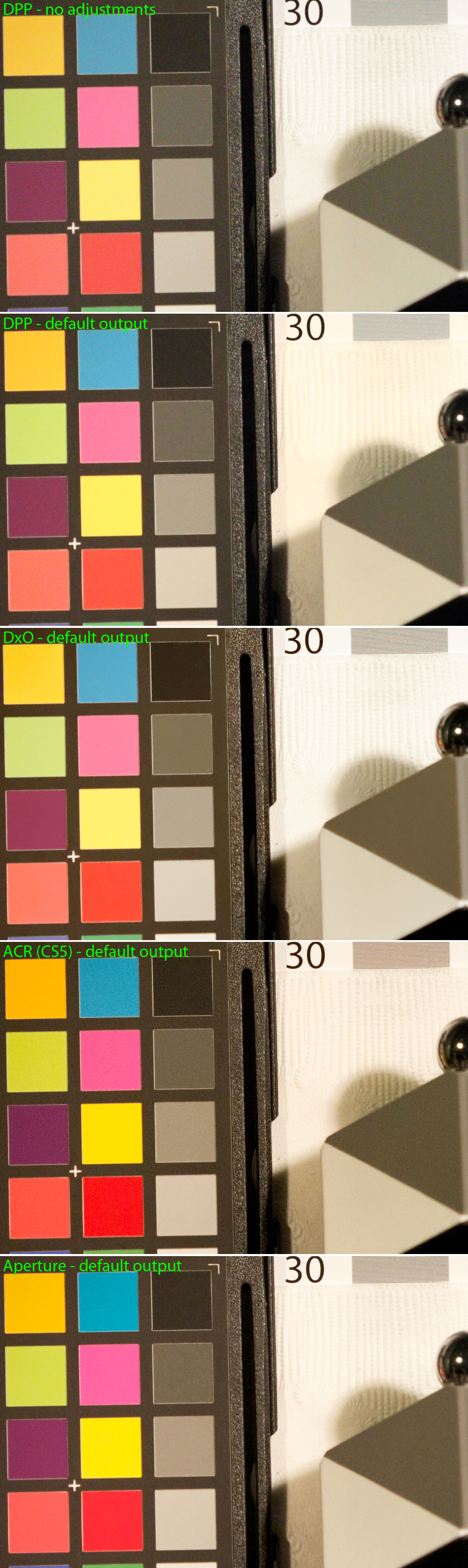
    I put together a quick comparison example of some popular RAW converters. I expect the primary difference in RAW converters is how they handle noise and color, and secondarily, how they handle lens corrections. For example, one reason I prefer DxO to ACR is that the former bases the lens corrections (distortion, vignetting, etc.) on controlled lab testing, whereas ACR's lens profiles are sometimes based on user-submitted results (subject to variation in lighting, etc.). Obviously, another important point is ease of workflow.

    For a comparison, I picked a test image with a fair bit of noise - an ISO 3200 shot from the 7D. This shot simulated real-world high-ISO use, i.e. I used ND filters to reduce the illumination, rather than a fast shutter speed in bright light (as is commonly used in ISO noise testing, and results in lower read noise that isn't necessarily reflective of real-world shots). Shot was with the 7D and EF 70-200mm f/2.8L IS II @ 85mm, 1/60 s, f/5.6.

    The same RAW image was converted to JPG with Canon's own DPP, DxO Optics Pro, Adobe Camera RAW (in CS5), and Apple Aperture 3. The appropriate camera and lens correction modules were used where available as part of the converter (i.e. all except Aperture 3, where you need a separate plugin).

    Unfortunately, different RAW converters use different algorithms and the relative settings mean different things in different programs - so, there's really no way to meaningfully compare across settings. The approach I took was to assume that the developers of the software know their software best, and chose default settings optimal for the camera and ISO setting - obviously, they're going to be biased to what the developers think a good image looks like, but at least it's a baseline for comparison. For DPP default, I used the Standard Picture Style (the 'no adjustment' image used Neutral).

    Here's what the output looks like (click for larger - 1600 pixels wide, which are 100% crops; warning: ~6 MB download):


    Personally, my order of preference is DxO > DPP > Aperture > Adobe Camera RAW. ACR looks grainy and oversaturated to me, and with Aperture the contrast is on the low side. Again, these are just the default settings - with specific, image-dependent adjustments better results are certainly possible with any of the packages.
    Last edited by neuroanatomist; 11-22-2011 at 07:48 PM.

  2. #2
    Senior Member
    Join Date
    Jan 2009
    Location
    The Netherlands
    Posts
    2,304
    Nice comparison John! Of course I want to know more about it
    Quote Originally Posted by neuroanatomist View Post
    For example, one reason I prefer DxO to ACR is that the former bases the lens corrections (distortion, vignetting, etc.) on controlled lab testing, whereas ACR's lens profiles are sometimes based on user-submitted results (subject to variation in lighting, etc.). Obviously, another important point is ease of workflow.
    Is that really a bad thing? The photos I take aren't really controlled lab photos either. I'm pretty sure DxO cannot do any better or worse on some of the photos I shot. Simply because they are so specific. Or does it read the focusing distance and correct for that as well? Distortion on a wide angle lens for a simple landscape shouldn't be too hard to correct, but what if there's an element close to the lens that is in focus?
    Also ease of workflow is an important reason? Why is that? Is DxO easier than for example LR where I apply changes during the import of my photos? I cannot imagine a more simplified method, it's one click on the button.
    Quote Originally Posted by neuroanatomist View Post
    Personally, my order of preference is DxO > DPP > Aperture > Adobe Camera RAW. ACR looks grainy and oversaturated to me, and with Aperture the contrast is on the low side.
    One thing that catches my eye immediately is the DxO picture. What happened with the "dirty white" part? The part under the "30" sign. DxO seems to wash it out completely where all of the others leave it alone. In high key images this could be fatal for details. Any idea what this is about? That's one reason I shouldn't put DxO on top

    If I compare the DPP no adjustment to DxO, I notice a little sharpening(which results in graininess), a little more saturation, a brown tint(different than all others) and washed out "dirty white"(also different than all the others)
    If I compare the DPP no adjustment to ACR I notice more sharpening(which results in even more graininess), and a definite increase of saturation it also has a slight brown tint, but not nearly as brown as DxO.

    Again, it's hard to make any conclusions by looking at this shot, since I have no clue what the original looks like. But I would personally worry about the washed out part.


    About LR: I have tried the L button now and I love it! Thanks for the tip Ben!

Posting Permissions

  • You may not post new threads
  • You may not post replies
  • You may not post attachments
  • You may not edit your posts
  •